
Butternut AI Blog
Gamma vs Durable vs Butternut AI: Which One To Choose?
If you're comparing Gamma, Durable, and Butternut AI to find the best AI website builder, here's an honest breakdown of all three to help you pick the right one.
Introduction
If you've already ruled out the big names and you're looking at AI-native website builders, you've probably come across Gamma, Durable, and Butternut AI. All three promise to get you online fast. All three use AI as the core of their product rather than an add-on feature. But they take very different approaches to what that means in practice. Let's discuss their differentiation in detail.
Gamma vs Durable vs Butternut AI
| Feature | Gamma | Durable | Butternut AI |
|---|---|---|---|
| Website generation speed | ~10 seconds for outline, ~4 minutes for full generation | ~2 minutes including onboarding, website ready by the end | Under 20 seconds |
| First draft quality | Decent with contextual images and copy, static (no animations) | Good quality with contextual images and copy, static (no animations) | Good quality with contextual copy, relevant images, good animations |
| User experience | Straightforward and smooth, outline-based approach takes some time | Smooth onboarding, editor is intuitive but adding sections can feel restrictive | One-step website generation, easy to learn and use |
| Post-generation customization | Via tooltips or AI agent | Via AI agent or tooltips | Via AI, tooltips, or HTML code |
| Design | Static template based | Static template based | Fully AI-generated, dynamic design and layout |
| SEO support | Basic manual SEO only (meta descriptions, URL paths) | Auto-optimized after content updates, meta tag suggestions, Discoverability tab with AI visibility score | Fully automated (meta tags, sitemaps, alt text) |
| AI blog generation | ✅ Topic suggestions + full post generation | ✅ Topic suggestions + full post generation | |
| AI social media marketing | ✅ Social media post generation | ✅ AI agents for Facebook, Instagram, LinkedIn | |
| AI chatbot for website | |||
| Custom HTML code | ✅ Embed support | ✅ Embed support + element-level editing | |
| Analytics | |||
| Customer support | Email support | Email support | Live chat, email & 1-on-1 call |
| 1-year free domain | ✅ Pro plan only | ||
| Hosting & SSL | |||
| Pricing | Free: $0/month, Plus: $12/seat/month, Pro: $25/seat/month, Ultra: $100/seat/month | Launch: $25/month, Grow: $99/month | Starter: $20/month, Pro: $69/month |
Gamma
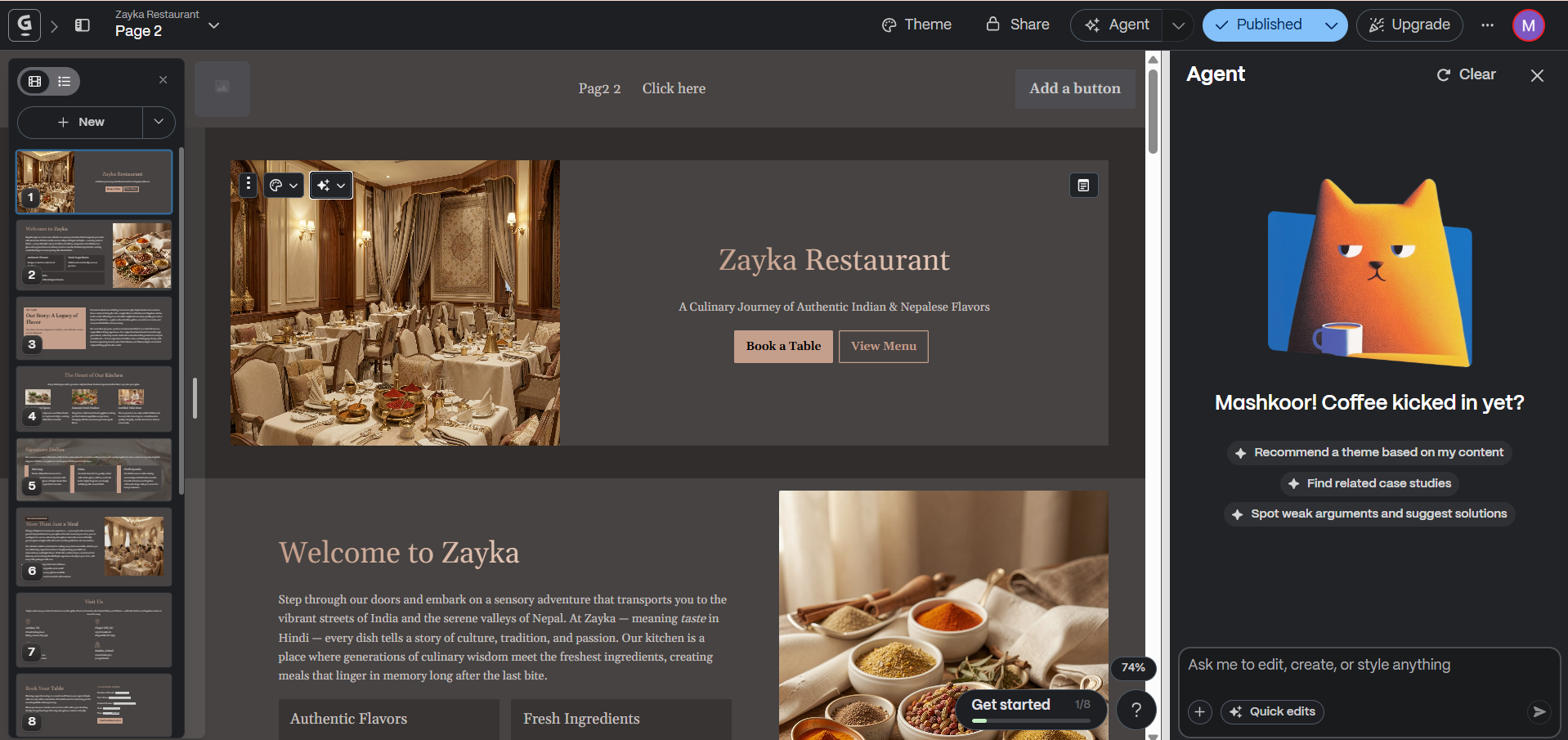
Gamma wasn't originally built as a website builder. It started as an AI-powered presentation tool and that reflects in both its strengths and its limitations as a website creation platform. It's clean, and genuinely good at turning a prompt into structured content quickly. For small businesses that need a simple, informational web presence without deep SEO needs, it works well. For anything more complex, you'll start running into its trade-offs.
Getting started with Gamma gives multiple options. You can generate from a one-line prompt, create from notes or existing content, import from a URL, or start from a template. If you go with the prompt option, Gamma generates an outline for your webpage within 10 seconds, presented as a set of cards, similar to how it handles presentations. You can edit each card manually, regenerate the entire outline, or adjust the length of text content and the visual style before moving forward. This outline review step takes a bit of time, but it gives you a chance to shape the direction of the page before the AI starts building, which means fewer surprises when the first draft appears.
The generation itself happens word by word and section by section. It looks satisfying to watch, but feels slow when generating a larger number of cards. For me, it generated 10 cards and took just over 4 minutes to complete. That's slower than both Durable and Butternut AI.
First Draft & Customization
The first draft quality is decent. The images are contextual and relevant to the website content. The copy matches the business and reads naturally. Where you'll want to spend time is on formatting and layout where things don't sit quite right and you'll want to make manual adjustments. What Gamma's first draft doesn't include is animations, which gives it a slightly flat feel compared to tools that build motion into the initial generation.
Post-generation editing works through tooltips or the AI agent. Tooltips let you change the layout, image, content, alignment, and width of individual cards. The AI agent can handle changes through natural language and new sections get generated in around 15 seconds.
One important constraint is that Gamma only lets you work on one page at a time. If you're building a multi-page website, each page has to be created separately, which adds to the time and breaks the flow of building out a complete site.
The cards panel on the left makes it easy to rearrange sections without hunting through the editor. The floating bar inside the editor lets you add blocks, images, layouts, and diagrams. A search function helps you find elements quickly without having to browse. When generating a new section using AI, Gamma shows you exactly how many credits it will use before you confirm.
Features
- Outline-based generation that lets you review and refine direction before the AI builds the page
- One-click restyle to instantly change the visual theme of your site
- Version history to go back to any previous state of your page
- Ability to embed webpages and apps directly into your site
- Smart diagrams built into the editor
- AI image generation with multiple source and styling options
- Reactions and comments on individual elements for team collaboration
- Credit usage shown before any AI generation so you always know the cost upfront
Limitations
- No animations in the first draft or editor
- No AI blog generation
- No AI social media marketing tools
- No AI chatbot for your website
- SEO support is basic and manual
- Analytics only available on the Pro plan
- Multi-page websites have to be built one page at a time, with no connected flow
- Some users report that the AI selects incorrect logos and colors, and image generation can fail even on paid tiers
- Some users report slow and unhelpful support responses
- Some users have found that Gamma disallows internal links due to platform restrictions, which can prevent their site from being indexed on Google
Pricing
| Plan | Price |
|---|---|
| Free | $0/month |
| Plus | $12/seat/month |
| Pro | $25/seat/month |
| Ultra | $100/seat/month |
Durable
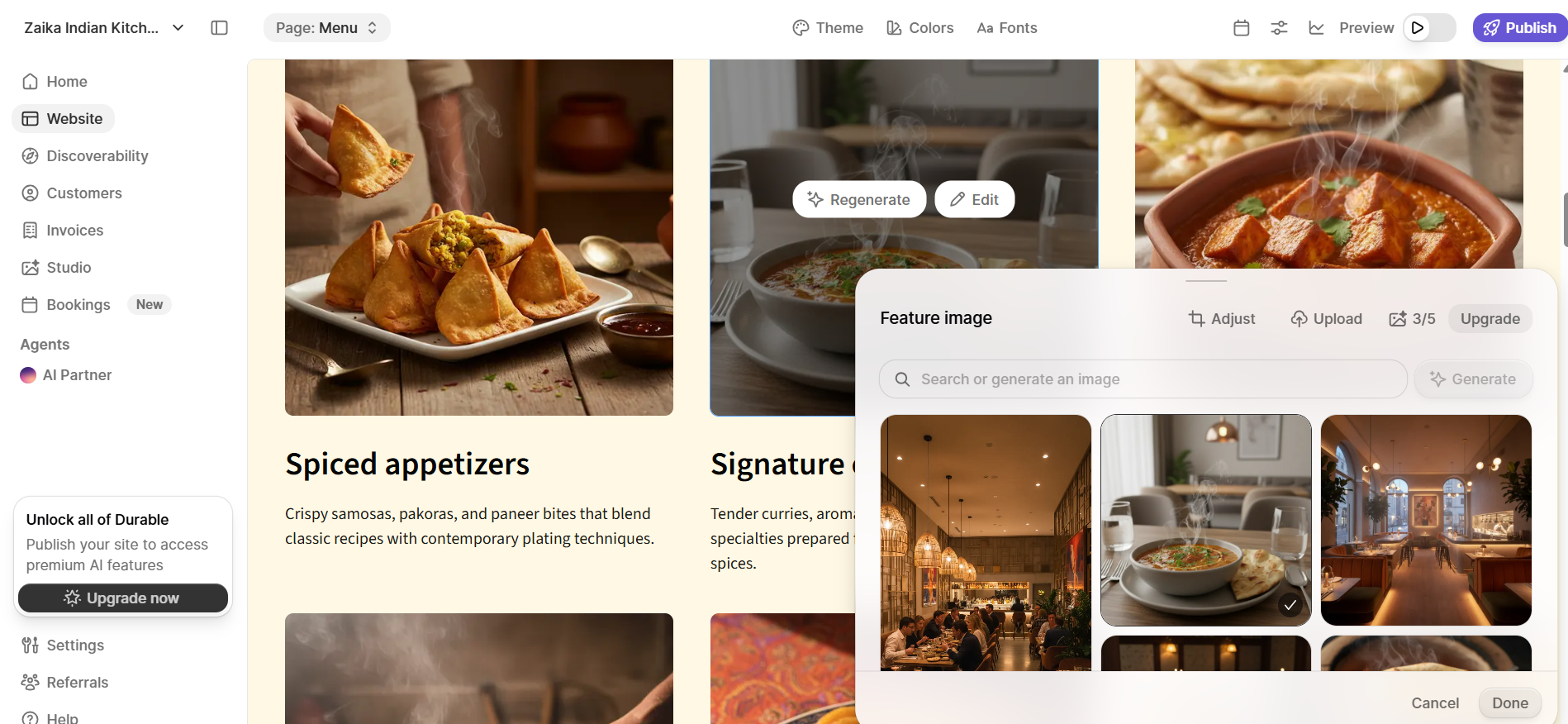
Durable takes a broader view of what a website builder should do. The pitch isn't just "build a website", it's "build your business." From the moment you sign up, the platform is thinking beyond the website itself and into the operations that run around it. It includes managing customers, sending invoices, generating marketing content, and tracking how visible your business is online. For small service businesses that want one platform to handle all of this, Durable makes a compelling case.
The onboarding experience reflects this philosophy. Instead of jumping straight into website generation, Durable sets up an entire workspace for your business first, covering your website, customer management, discoverability, and more. The whole process takes around 2 minutes, and by the time it's done, your website is already generated and waiting for you. There's no separate generation step, no loading screen to sit through. You answer a few questions, and when the setup completes, you have the first draft of your website.
First Draft & Customization
The first draft quality is good. The layout, images, and copy are all contextual and relevant to your business. What it doesn't include is animations. Like Gamma, the first draft is static, which means the site looks professional but doesn't have the dynamic feel that Butternut AI delivers out of the box.
An AI agent lives in both the dashboard and the website editor, and it's one of Durable's more useful features. In the editor, it can regenerate specific images or rewrite copy on request. One quirk worth knowing is that copy regeneration takes noticeably longer than image regeneration, which can make iterative editing feel uneven.
Adding new sections requires choosing from a set of category options first. Once you select a category, Durable takes anywhere between 15 to 45 seconds to generate the section depending on complexity, and if you want the AI to generate a custom section, it takes you to a separate screen, which resets the chat each time you go back to the editor to check the result. It's a workflow that works, but feels fragmented compared to how Butternut AI handles section-level editing.
Some users find that the sites Durable generates look generic and lack the kind of visual distinctiveness that comes with more customizable platforms. And a concern that comes up repeatedly among users is that you cannot export or own your website's code, meaning if Durable ever shuts down, your site goes with it.
Features
- Full business workspace on setup including website, CRM, invoicing, discoverability, and marketing tools all in one place
- AI blog builder with topic suggestions and full post generation
- AI image generation with assets saved to a dedicated studio library
- Google Ad writer for creating ad copy directly from the platform
- Social media post generation for major platforms
- CRM for managing customer details, interactions, and contact forms
- Invoicing with payment processing via Stripe
- Discoverability tab showing AI visibility rankings, a visibility score, and an SEO checklist
- Custom HTML embedding for third-party tools and tracking scripts
- Ability to generate a website directly from a Google Business Profile
Limitations
- No animations in the first draft
- No AI chatbot for website visitors
- No native email marketing
- Adding new sections forces a category selection and opens a separate screen for AI generation, breaking the editing flow
- Some users find the sites look generic with limited options for creative customization
- Some users have raised concerns about not being able to export or own the website code
- Limited third-party integrations compared to more established platforms
Pricing
| Plan | Price |
|---|---|
| Launch | $25/month |
| Grow | $99/month |
Butternut AI
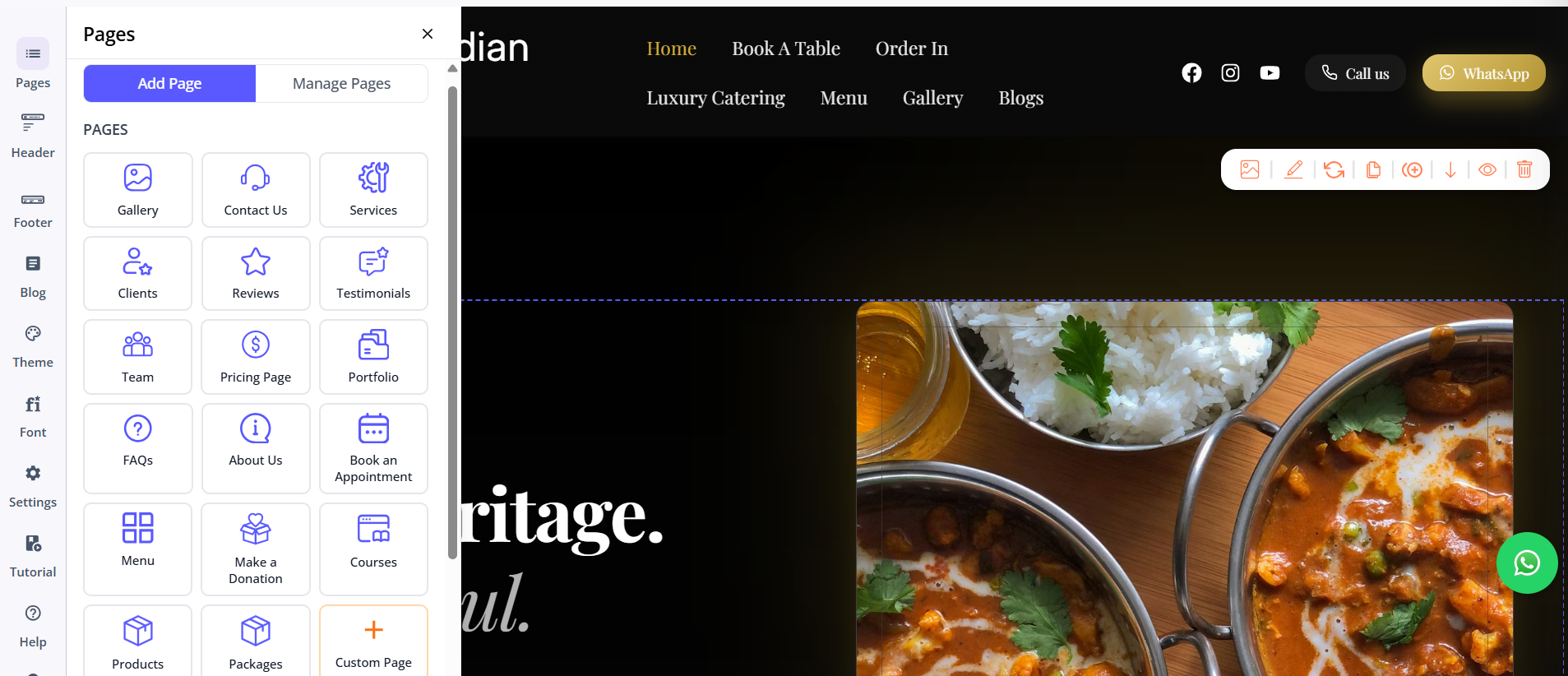
Butternut AI is the most focused of the three. Where Gamma leans into its presentation tool roots and Durable tries to be an all-in-one business platform, Butternut AI has a single, clear priority: get a professional website live as fast as possible, with AI handling as much of the work as possible. It's not trying to be your CRM or your invoicing tool. It's trying to be the best AI website builder in the room and it delivers.
You give Butternut AI your business name and a short description of what you do and within 20 seconds, your website is ready, built section by section, so you can watch it take shape rather than wait for a loading screen. The experience is faster than both Gamma and Durable.
First Draft & Customization
The first draft it produces is the strongest of the three. The copy in the first draft reads like it was written specifically for your business, the CTAs make sense in context, the images are matched to your industry and tone and animations are present from the start. The result is a website that feels alive and finished rather than like a starting point that needs significant work.
Post-generation editing is where Butternut AI's approach really shows its advantage. You're not hunting through tooltips or navigating to a separate screen. You describe what you want and the AI handles it. You can regenerate a single section, regenerate the copy in a different tone or ask for a custom section to be created.
For users who want more granular editing control, Butternut AI supports both custom HTML embedding and direct HTML editing of individual website elements, giving you the ability to make precise, design-level changes that neither Gamma nor Durable can match. It's a level of flexibility that makes the platform more capable than its simple setup suggests.
Features
- Full website generated from a single prompt in under 20 seconds
- AI blog writer with built-in topic suggestions tailored to your business
- AI social media marketing agents for Facebook, Instagram, and LinkedIn that generate and publish content automatically
- AI chatbot for your website that captures leads and answers visitor questions 24/7
- Fully automated SEO with meta tags, sitemaps, and alt text handled from day one
- Auto-responsive mobile design
- Free hosting, SSL, and a custom domain for the first year on all paid plans
- Live chat, email support, and 1-on-1 calls available
Limitations
- No native email marketing
- No built-in CRM or invoicing
- Smaller integrations ecosystem compared to Durable's business tools
- Newer platform with a smaller team, though support quality is consistently rated positively
Pricing
| Plan | Price |
|---|---|
| Starter | $20/month |
| Pro | $69/month |
Which One Should You Choose?
All three tools are genuinely AI-first, and all three can get a business online faster than any traditional builder. What separates them is what they prioritize beyond the website itself.
But if what you need is a professional website that goes live fast, looks good from the first draft, and keeps working for your business after launch through automated SEO, AI-generated blog content, and social media agents that post for you, Butternut AI is the tool built for that job. There's a free plan, setup takes under a minute, and if it's not for you, you've lost nothing more than 20 seconds. That's a trade worth making.